Thursday, August 16, 2012
Packet Capture Retention Policy???
How long should I store packet captures? How much storage should I provision to monitor a 10Gbps link? When is NetFlow enough, and when do I need to capture at the packet level?
These are questions network operations managers everywhere are asking, because unfortunately best practices for network data retention policies are hard to find. Whereas CIOs now generally have retention policies for customer data, internal emails, and other kinds of files, and DBAs generally know how to implement those policies, the right retention policy for network capture data is less obvious.
The good news is that there are IT shops out there that are ahead of the curve and have figured a lot of this out.
Background
To begin with, it’s important to clarify for your own organization what the goals are for network history. Some common answers include:
Respond faster to difficult network issues
Establish root cause and long-term resolution
Contain cyber-security breaches
Optimize network configuration
Plan network upgrades.
You may notice that the objectives listed above vary in who might use them: stakeholders could include Network Operations, Security Operations, Risk Management, and Compliance groups, among others. While these different teams often operate as silos in large IT shops, in best-practice organizations these groups are cooperating to create a common network-history retention policy that cuts across these silos (and in the most advanced cases, they have even begun to share network-history infrastructure assets, a topic we discussed here).
Some of your objectives may be met by keeping summary information – events, statistics, or flow records for example – and others commonly require keeping partial or full packet data as well. A good retention policy should address the different types of network history data, including:
Statistics
Events
Flow records – sampled
Flow records – 100%
Enhanced flow records or metadata (such as IPFIX, EndaceVision metadata, etc.)
Full packet data – control plane
Full packet data – select servers, clients, or applications
“Sliced” packet headers – all traffic
Full packet data – all traffic.
Generally speaking, the items at the top of the list are smaller and therefore cheaper to keep for long periods of time; while the items at the bottom are larger and more expensive to keep, but much more general. If you have the full packet data available you can re-create any of the other items on the list as needed; without the full packet data you can answer a subset of questions. That leads to the first principle: keep the largest objects (like full packet captures) for as long as you can afford (which is generally not very long, because the data volumes are so large), and keep summarized data for longer.
Next, you should always take guidance from your legal adviser. There may be legal requirements arising from regulation (PCI, Rule 404, IEC 61850, etc.), e-discovery, or other sources; this article is not meant to be legal advice.
Now that said, in the absence of specific legal requirements that supersede, here are the best practices we’re seeing in the industry. Working the list from bottom to top:
Packet data for all traffic: 72 hours
Full packet data or “sliced” packet headers? The choice here will depend on how tightly controlled your network is and on what level of privacy protection your users are entitled to. For highly controlled networks with a low privacy requirement, such as banking, government or public utilities, full packet capture is the norm. For consumer ISPs in countries with high privacy expectations, packet header capture may be more appropriate. General enterprise networks fall somewhere in between.
Whichever type of packet data is being recorded, the goal consistently stated by best-practice organizations is a minimum of 72 hours retention, to cover a 3-day weekend.
For the most tightly-controlled networks retention requirements may be 30 days, 90 days, or longer.
Packet data for control plane & for select traffic: 30+ days
Control plane traffic can be extremely useful in troubleshooting a wide variety of issues. It’s also a type of traffic that is owned by the network operator, not the customer, so even networks that don’t record all traffic should keep history here.
Traffic types of interest include for example:
Routing protocols (OSPF, IS-IS, EIGRP, BGP; plus protocols like RSVP, LDP, BFD, etc. in carriers)
L2 control plane (ARP, spanning tree, etc.)
ICMP
DHCP
DNS
LDAP, RADIUS, Active Directory
Signaling protocols like SIP, H.225.0, SCCP, etc.
GTP-C in mobile networks
In addition to control plane traffic, in every network there are particular servers, clients, subnets, or applications that are considered particularly important or particularly problematic. For both control-plane and network-specific traffic of interest, organizations are storing a minimum of 30 days of packet data. Some organizations store this kind of data for up to a year.
Flow records @ 100%: 120+ days
Best-practice organizations record either enhanced metadata (such as that collected by EndaceVision), or at least basic NetFlow v5/v9/IPFIX.
This flow data is useful for a wide variety of diagnosis and trending purposes. Although a few router models can generate flow records on 100% of traffic, best-practice is to separate this function onto a separate probe appliance connected to the network via tap, SPAN or matrix switch. The probe appliance both offloads the router/switch and also enhances flow data with DPI / application identification information.
Best-practice here is to store at least 120 days of flow data. (We have seen organizations that keep 100% flow records for as long as seven years.)
Samples and summaries: 2 years or more
sFlow or sampled NetFlow, using 1:100 or 1:1000 packet samples, can be useful for some kinds of trending and for detecting large-scale Denial of Service attacks. There are significant known problems with sampled NetFlow, so it’s not a replacement for 100% flow, but it does have usefulness for some purposes.
Summary traffic statistics – taken hourly or daily, by link and by application – can also be helpful in understanding past trends to help predict future trends.
Because this data takes relatively little space, and because it is mostly useful for trending purposes, organizations typically plan to keep it for a minimum of two years.
One point to remember in maintaining history over periods of a year or longer is that network configurations may change, creating discontinuities. It’s important to record every major network topology change or configuration change alongside your traffic history data, so you don’t compare incomparable data and draw the wrong conclusions.
Average vs Peak vs Worst-case?
One challenge faced in sizing network-history storage capacity is the fact that well-designed networks run well below 100% capacity most of the time, but in times of stress (which is when network history is most valuable) they may run much hotter. Should you size for 72 hours of typical traffic, or 72 hours of worst-case?
The best-practice we’ve seen here is to make sure your network history system can capture at worst-case rate, but has enough storage provisioned for typical rate. The reasoning here is that when the network gets very highly loaded, someone will be dragged out of bed to fix it much sooner than 72 hours, so a long duration of history is not needed; but that person will want to be able to rewind to the onset of the event and will want to see a full record of what was happening immediately before and after, so having a system that records all traffic with zero drops is crucial.
Here’s an example to make it concrete:
Suppose you have a 10Gbps link that averages 1Gbps over a 24-hour period, and 3Gbps over the busiest hour of the day.
Then 72 hours of full packet storage at typical load would require
(1Gbit/sec x 72 hours x 3600 sec/hour / 8 bits/byte)
= 32400 Gbytes, or about 32 terabytes.
Under worst-case load, when recording is most important, it could run at the full 10Gbps, which would fill storage 10 times as fast. The good news is: best-practice here says you do not need to provision 10x the storage capacity, but you should be using a capture system that can record at the full 10Gbps rate. That means that in a worst-case scenario your storage duration would be more like 7 hours than 70; but in that kind of scenario someone will be on the case in much less than 7 hours, and will have taken action to preserve data from the onset of the event.
Of course, the same considerations apply for other types of network history: systems need to be able to process and record at the worst-case data rate, but with reduced retention duration.
Other considerations
The above discussion slightly oversimplifies the case; there are actually two more important considerations to keep in mind in sizing storage for network history.
First, most recording systems will store some metadata along with packet captures, and this adds some overhead to the storage needed – typically around 20%, though it may vary depending on the traffic mix and on the recording product you use.
Second, while we say above you should provision storage for typical load, most organizations actually use projected typical load, extrapolating the traffic trend out to 18-36 months from design time. How far ahead you look depends on how often you are willing to upgrade the disks in your network recording systems. A three-year upgrade cycle is typical, but with disk capacity and costs improving rapidly there are situations where it can be more cost-effective to provision less storage up front and plan to upgrade every 24 months.
Implementing the policy
When organizations first take on the challenge of standardizing network-history retention policy, they nearly always discover that their current retention regime is far away from where they think it needs to be.
Typically we have seen that implementing a best-practice retention policy happens in six phases:
Create the “idealized” policy describing where you want to be, without regard to current state
Inventory the current state and identify how far off it is from the ideal
Set targets for 3-6 months, 12 months and 24 months
Over the 3-6 month horizon, take low-hanging fruit by reconfiguring existing systems to optimize for the new policy, and identify what new technologies will be needed to achieve the chosen retention policy
Over the 12-month horizon, pilot any new technologies that may be required to achieve the long-term policy
Over the 24-month horizon, roll out these technologies network-wide.
Summary checklist
Bring together stakeholders to develop a common network-history retention policy
Understand everyone’s objectives
Check with legal adviser
Choose what types of data will be kept for what purposes
Set idealized retention goals for each
Inventory current state and gaps
Close the gaps over 24 months.


Monday, November 22, 2010
Why Protocol Validation is Important!!!
I've played with a lot of security technologies over the years and I’m quite amazed at the lack of protocol validation implemented with a majority of the commercial security solutions in the market today.
Protocol validation is really a very effective way to address zero-day attacks, application attacks, worms, and numerous other attack vectors. For example, let's say your web server receives a client request for an unknown method, before processing such a request, ask yourself what is an effective way to deal with unknown method attacks. Would signatures be an appropriate solution? Maybe trapping the requests and creating an error on the web server would be a better solution – I would do this on the server side. I would also argue, at least for network security devices, that inspecting the traffic for any method that exceeds a set number of alphanumeric characters (this should be a configurable parameter) would be a better way to go...
Say some unknown method is received over the network that is not a GET, HEAD, POST, PUT or whatever else you deem suitable for your web serving environment, instead of trying to come up with various signatures to combat an unknown method attack, simply allow a set number of methods and address the unknown methods by limiting them to say 15 characters. Any unknown method attack that exceeds 15 characters (in this example) will not be allowed to the web servers. This will save on system resources, security analysis time, and provide a nice mechanism to address various protocol issues. Yes security signatures are important, but it’s a mistake to limit your security solutions to just signature matching alone - look into protocol validation as well!
The unknown method attack I describe here is just one example I'm highlighting to show that protocol validation can capture any variant of an unknown method attack quickly and efficiently. Same is true if you implement protocol validation on various URI parameters. You can also apply protocol validation to other services like MS RPC services, MS CIFS services, DNS, SSH, SIP, etc.
Remember Conficker? Conficker is a MS RPC worm that makes changes to UUID/Stub Lengths in Microsoft’s Operating Systems. Instead of relying on signatures to catch every variant of Conficker, why not use protocol validation to protect the various UUID/Stub Lengths in the OS and allow users to customize and set maximum stub lengths for each operation number and UUID accordingly? This would provide proactive protection against a variety of MS RPC attacks without relying on any signatures.
There are many benefits to incorporating protocol validation into your security solutions and it must become an integral part of any network security device being considered today to mitigate network attacks against your systems or you will simply be too exposed.
Next time you evaluate some sort of network security device, make sure you check whether protocol validation is being enforced in a comprehensive way, if not, move on...
Stay secure!
-boni bruno
Protocol validation is really a very effective way to address zero-day attacks, application attacks, worms, and numerous other attack vectors. For example, let's say your web server receives a client request for an unknown method, before processing such a request, ask yourself what is an effective way to deal with unknown method attacks. Would signatures be an appropriate solution? Maybe trapping the requests and creating an error on the web server would be a better solution – I would do this on the server side. I would also argue, at least for network security devices, that inspecting the traffic for any method that exceeds a set number of alphanumeric characters (this should be a configurable parameter) would be a better way to go...
Say some unknown method is received over the network that is not a GET, HEAD, POST, PUT or whatever else you deem suitable for your web serving environment, instead of trying to come up with various signatures to combat an unknown method attack, simply allow a set number of methods and address the unknown methods by limiting them to say 15 characters. Any unknown method attack that exceeds 15 characters (in this example) will not be allowed to the web servers. This will save on system resources, security analysis time, and provide a nice mechanism to address various protocol issues. Yes security signatures are important, but it’s a mistake to limit your security solutions to just signature matching alone - look into protocol validation as well!
The unknown method attack I describe here is just one example I'm highlighting to show that protocol validation can capture any variant of an unknown method attack quickly and efficiently. Same is true if you implement protocol validation on various URI parameters. You can also apply protocol validation to other services like MS RPC services, MS CIFS services, DNS, SSH, SIP, etc.
Remember Conficker? Conficker is a MS RPC worm that makes changes to UUID/Stub Lengths in Microsoft’s Operating Systems. Instead of relying on signatures to catch every variant of Conficker, why not use protocol validation to protect the various UUID/Stub Lengths in the OS and allow users to customize and set maximum stub lengths for each operation number and UUID accordingly? This would provide proactive protection against a variety of MS RPC attacks without relying on any signatures.
There are many benefits to incorporating protocol validation into your security solutions and it must become an integral part of any network security device being considered today to mitigate network attacks against your systems or you will simply be too exposed.
Next time you evaluate some sort of network security device, make sure you check whether protocol validation is being enforced in a comprehensive way, if not, move on...
Stay secure!
-boni bruno
Monday, January 4, 2010
Malicious PDF documents on the rise...
There are some nasty malicious PDF files (read more…) going around the Internet for which most Anti-Virus tools provide little or no detection. As a good security precaution, if you use or read PDF files, you should take the following two actions:
1. Make sure you are using the latest version of Adobe Reader (formerly known as Adobe Acrobat Reader), which as of this writing is 9.2.0 (Open Adobe Reader and choose Help->About… to see what version you have installed, and then Help->Check for Updates to get the latest version.)
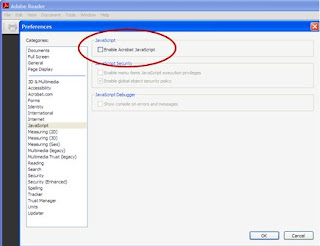
2. Open Adobe Reader and disable JavaScript by choosing Edit->Preferences->JavaScript and the uncheck the checkbox next to “Enable Acrobat JavaScript” as shown below.
Wishing you a safe computing year in 2010,
-boni bruno
1. Make sure you are using the latest version of Adobe Reader (formerly known as Adobe Acrobat Reader), which as of this writing is 9.2.0 (Open Adobe Reader and choose Help->About… to see what version you have installed, and then Help->Check for Updates to get the latest version.)

2. Open Adobe Reader and disable JavaScript by choosing Edit->Preferences->JavaScript and the uncheck the checkbox next to “Enable Acrobat JavaScript” as shown below.

Wishing you a safe computing year in 2010,
-boni bruno
Friday, June 26, 2009
Physical Access Control - The New Way
Historically, physical access controls have never run over IP networks, but now with Cisco in the game, the convergence for a complete physical access control solution over IP networks is now a reality.
The Cisco Physical Access Control solution is made up of both hardware and software components. The Cisco Access Gateway connects door hardware (traditional readers and locks,as well as the new Hi-O® hardware from Assa Abloy) to an IP network. In wired deployments, the device is capable of being powered by Power over Ethernet (PoE). It is also possible to connect to the gateway over a Wi-Fi 802.11a/b/g wireless link.
The diagram below depicts a typical Cisco PAC archtiecture:

Since there is a gateway for each door, access control can be deployed incrementally, door by door. There is no central panel; this simplifies system design, wiring, and planning, resulting in significant cost savings over legacy architectures. Additional modules can be connected to the gateway, allowing for extensibility. All communication from and to the gateways is encrypted.
The Cisco Physical Access Control solution offers the following modules (in addition to the Access Gateway):
* Reader module: This module can connect to a complete set of door hardware, allowing an additional door to be controlled by the same gateway.
* Input module: Eight supervised inputs can be connected to this module and controlled
through the gateway.
* Output module: Eight outputs can be connected to this module and controlled through the gateway.
Cisco Physical Security Manager (CPSM) is the software application used to manage the Cisco Access Gateways on the network. The Web-based software provisions, monitors, and controls all the access control gateways on the network. Role-based access control policies are supported for CPSM. You can create access control policies for N-person, two-door, anti-passback, etc.
CPSM also integrates with MS Active Directory, LDAP, and some HR databases.
CPSM is integrated with the Cisco Video Surveillance family of products, enabling an organization to associate cameras with doors, and to view video associated with access control events and alarms.
In addition to basic access control features, Cisco plans to integrate physical access control with network security to provide a comprehensive solution that spans both areas of security, allowing enterprises to:
* Create and enforce policies so that network and application access is granted based on the physical location of employees
* Provide wireless access only if employees have badged into a physical location.
* Terminate an employee’s active VPN connection when that employee badges into a physical location
* Change an employee’s privileges on the network based on entering or exiting a secure area
There is no question that Cisco is accelerating convergence in the physical security industry. The move to integrate physical access control and network security is something I've been preaching for a while now, it will be interesting to see how this evolves over time. I'll keep you posted...
Stay secure,
-boni bruno
The Cisco Physical Access Control solution is made up of both hardware and software components. The Cisco Access Gateway connects door hardware (traditional readers and locks,as well as the new Hi-O® hardware from Assa Abloy) to an IP network. In wired deployments, the device is capable of being powered by Power over Ethernet (PoE). It is also possible to connect to the gateway over a Wi-Fi 802.11a/b/g wireless link.
The diagram below depicts a typical Cisco PAC archtiecture:

Since there is a gateway for each door, access control can be deployed incrementally, door by door. There is no central panel; this simplifies system design, wiring, and planning, resulting in significant cost savings over legacy architectures. Additional modules can be connected to the gateway, allowing for extensibility. All communication from and to the gateways is encrypted.
The Cisco Physical Access Control solution offers the following modules (in addition to the Access Gateway):
* Reader module: This module can connect to a complete set of door hardware, allowing an additional door to be controlled by the same gateway.
* Input module: Eight supervised inputs can be connected to this module and controlled
through the gateway.
* Output module: Eight outputs can be connected to this module and controlled through the gateway.
Cisco Physical Security Manager (CPSM) is the software application used to manage the Cisco Access Gateways on the network. The Web-based software provisions, monitors, and controls all the access control gateways on the network. Role-based access control policies are supported for CPSM. You can create access control policies for N-person, two-door, anti-passback, etc.
CPSM also integrates with MS Active Directory, LDAP, and some HR databases.
CPSM is integrated with the Cisco Video Surveillance family of products, enabling an organization to associate cameras with doors, and to view video associated with access control events and alarms.
In addition to basic access control features, Cisco plans to integrate physical access control with network security to provide a comprehensive solution that spans both areas of security, allowing enterprises to:
* Create and enforce policies so that network and application access is granted based on the physical location of employees
* Provide wireless access only if employees have badged into a physical location.
* Terminate an employee’s active VPN connection when that employee badges into a physical location
* Change an employee’s privileges on the network based on entering or exiting a secure area
There is no question that Cisco is accelerating convergence in the physical security industry. The move to integrate physical access control and network security is something I've been preaching for a while now, it will be interesting to see how this evolves over time. I'll keep you posted...
Stay secure,
-boni bruno
Wednesday, January 7, 2009
DRM Free Music - Wow what a concept!!!
Have you heard the news??? Apple has convinced the big music studios to let them distribute DRM Free music.
http://www.nytimes.com/2009/01/07/technology/companies/07apple.html?_r=1&hp
It's about time and something the music industry should have considered long ago.
The issue now is that Apple is the only organization with the license to do this. This gives Apple too much leverage in my opinion. We need more legitimate distribution channels and keep things competitive for the benefit of consumers, but this is definitely a move in the right direction...
Well done!
- boni bruno
http://www.nytimes.com/2009/01/07/technology/companies/07apple.html?_r=1&hp
It's about time and something the music industry should have considered long ago.
The issue now is that Apple is the only organization with the license to do this. This gives Apple too much leverage in my opinion. We need more legitimate distribution channels and keep things competitive for the benefit of consumers, but this is definitely a move in the right direction...
Well done!
- boni bruno
Sunday, May 18, 2008
What Industry Executives need to know about DRM...
DRM stands for Digital Rights Management. It has also become known as Digital Restrictions Management as a backlash from all the problems and issues DRM has caused hardware manufacturers, software development companies, media distributors and consumers over the years. Consumers want on demand music, video, movies anywhere at anytime and they are willing to pay for it. I've done enough research and field tests to make this claim. This is also true for media distributors and retailers who have been yearning for the ability to manufacture media on demand to consumers. However, many current DRM policies and technologies do not facilitate this kind of media access and distribution. Until we foster and promote better DRM strategies, money will continue to be lost to the pirates...
I meet with industry executives all the time and content protection and the secure distribution of content is a very big deal. DRM is important to the Entertainment, Music and Media industries, i.e. the content producers, in that these industries want to safe guard their intellectual property and copyright protected material from piracy so their financial interests can be protected. Make sense to me.
With respect to piracy, the music industry has been hit the hardest with significant drops in sales year over year. It's still very common to see people share music files over peer-to-peer networks and not think twice about having to pay a single cent. Also, boot leg copies of the latest movies are readily available on the net or DVD just about anywhere you go. Bottom line, piracy continues to run rampant and it's an issue that needs to be better addressed moving forward.
The goal behind DRM is to ensure that copyright protected media is accessible to only the consumers that pay for it. Many of the negative connotations associated with DRM are derived from the poor designs employed by many content protection schemes as well as from the notorious Digital Millennium Copyright Act passed in the U.S. in 1998. I'll talk more about DRM technologies later, but DMCA is the entertainment and media industries strategy to make it illegal for anyone to develop and use products that circumvent DRM related technologies. This is huge and has both good and bad implications. The spirit behind the DMCA law makes sense, but the law itself as written, interpreted and legally practiced has short comings. DMCA allows content producers to license and dictate how hardware manufacturers and software development companies enforce DRM technologies in their media related products. In short, media hardware manufacturers and software companies have to support and integrate licensed DRM technologies to comply with the mandates of DMCA.
As a result, there have been a slew of licensed DRM technologies integrated and deployed by various hardware manufacturers over the years from analog protection systems, Marcovision and Dwight Cavendish, to content protection systems like CSS, DTCP, HDCP, TIVOGUARD, etc. DCMA also influence software companies to embed DRM technologies into their products, e.g. Microsoft's Windows Media DRM and Real Network's Helix DRM. There has been extensive criticism that DMCA forces all companies that make media related equipment or software to support DRM technologies that financially benefit specific organizations only and no one else which potentially inhibit innovation and good old fashion competition. DMCA also makes litigation by media companies very easy regardless of whether a direct copy right violation has occurred. This has caused many respected scientific research and security related web portals to just shut down and has provoked many heated arguments about justice and the right to compete.
As technological advancements are made with High Definition TV, IPTV, Broadband, WiFi, and Mobile technologies, new emerging DRM systems are being developed to keep up - Advance Access Content System, Broadcast Flag, MagicGate, Open Mobile Alliance, SmartRight, Video Content Protection System are emerging DRM technologies that will be licensed in many products to come.
The big question I want you to think about is whether or not we are headed down the right path. Does DRM practices have to be so nasty? A well known example is Sony's decision to integrate a rootkit to copy protect their music CD's. This turned into a huge PR nightmare and caused Sony to recall the music cd's and rethink it's whole DRM strategy and left many consumers in a outrage! There are many cases where web sites were shutdown due to DMCA violations, it’s a good thing the safe harbor provisions were put into DCMA or many ISP would be out of business and half the internet would be gone.
I offer that there is a better solution. I believe the right DRM strategy is to make things simple and easily accessible to the consumers and media distributors. I believe consumers in general are good people and will pay for copy protected media if it’s readily available, globally reachable, and fast. This is not to say we throw security technologies out the door (God knows that would impact me financially), but rather make it clear to the industry that DRM strategies needs to evolve and focus less on restricting the rights of consumers and more to promote the availability and access channels that allow consumers to pay for copy protected material.
I'm a big fan of global media distribution networks and the download-and-burn concept. The sooner we go to market with IPTV, HDTV, High Speed Broadband & Mobile Communications, easily accessible and feature rich set top boxes and media devices, and employ the use of multiple broadcast and distribution channels and just flood consumers and media distributors with every imaginable means to buy licensed content - guess what?
THEY WILL!!!
I meet with industry executives all the time and content protection and the secure distribution of content is a very big deal. DRM is important to the Entertainment, Music and Media industries, i.e. the content producers, in that these industries want to safe guard their intellectual property and copyright protected material from piracy so their financial interests can be protected. Make sense to me.
With respect to piracy, the music industry has been hit the hardest with significant drops in sales year over year. It's still very common to see people share music files over peer-to-peer networks and not think twice about having to pay a single cent. Also, boot leg copies of the latest movies are readily available on the net or DVD just about anywhere you go. Bottom line, piracy continues to run rampant and it's an issue that needs to be better addressed moving forward.
The goal behind DRM is to ensure that copyright protected media is accessible to only the consumers that pay for it. Many of the negative connotations associated with DRM are derived from the poor designs employed by many content protection schemes as well as from the notorious Digital Millennium Copyright Act passed in the U.S. in 1998. I'll talk more about DRM technologies later, but DMCA is the entertainment and media industries strategy to make it illegal for anyone to develop and use products that circumvent DRM related technologies. This is huge and has both good and bad implications. The spirit behind the DMCA law makes sense, but the law itself as written, interpreted and legally practiced has short comings. DMCA allows content producers to license and dictate how hardware manufacturers and software development companies enforce DRM technologies in their media related products. In short, media hardware manufacturers and software companies have to support and integrate licensed DRM technologies to comply with the mandates of DMCA.
As a result, there have been a slew of licensed DRM technologies integrated and deployed by various hardware manufacturers over the years from analog protection systems, Marcovision and Dwight Cavendish, to content protection systems like CSS, DTCP, HDCP, TIVOGUARD, etc. DCMA also influence software companies to embed DRM technologies into their products, e.g. Microsoft's Windows Media DRM and Real Network's Helix DRM. There has been extensive criticism that DMCA forces all companies that make media related equipment or software to support DRM technologies that financially benefit specific organizations only and no one else which potentially inhibit innovation and good old fashion competition. DMCA also makes litigation by media companies very easy regardless of whether a direct copy right violation has occurred. This has caused many respected scientific research and security related web portals to just shut down and has provoked many heated arguments about justice and the right to compete.
As technological advancements are made with High Definition TV, IPTV, Broadband, WiFi, and Mobile technologies, new emerging DRM systems are being developed to keep up - Advance Access Content System, Broadcast Flag, MagicGate, Open Mobile Alliance, SmartRight, Video Content Protection System are emerging DRM technologies that will be licensed in many products to come.
The big question I want you to think about is whether or not we are headed down the right path. Does DRM practices have to be so nasty? A well known example is Sony's decision to integrate a rootkit to copy protect their music CD's. This turned into a huge PR nightmare and caused Sony to recall the music cd's and rethink it's whole DRM strategy and left many consumers in a outrage! There are many cases where web sites were shutdown due to DMCA violations, it’s a good thing the safe harbor provisions were put into DCMA or many ISP would be out of business and half the internet would be gone.
I offer that there is a better solution. I believe the right DRM strategy is to make things simple and easily accessible to the consumers and media distributors. I believe consumers in general are good people and will pay for copy protected media if it’s readily available, globally reachable, and fast. This is not to say we throw security technologies out the door (God knows that would impact me financially), but rather make it clear to the industry that DRM strategies needs to evolve and focus less on restricting the rights of consumers and more to promote the availability and access channels that allow consumers to pay for copy protected material.
I'm a big fan of global media distribution networks and the download-and-burn concept. The sooner we go to market with IPTV, HDTV, High Speed Broadband & Mobile Communications, easily accessible and feature rich set top boxes and media devices, and employ the use of multiple broadcast and distribution channels and just flood consumers and media distributors with every imaginable means to buy licensed content - guess what?
THEY WILL!!!
Wednesday, February 6, 2008
Performance Anomalies Can Be A Sign of Bigger Problems...
I have a great story to tell you...I get a call from one of my clients,
they are a big real estate management and development company
with many large Oracle databases and various Unix and Microsoft
systems, a large SAN, and they run the network on the high-end
Cisco stuff. Typical architecture for a large enterprise.
These guys have a lot of vendor consultants on site helping them out
with new Oracle Apps, Unix systems, etc. The problem, I'm told by one
of their Senior Vice Presidents, is intermittent performance problems that affect the network and the Oracle Apps.
Hmmm...probing him further for more details did not give me much. He did explain to me that none of their Oracle or Unix consultants saw any problems with anything, the system administrators didn't see any problems on the systems, but the network guys were seeing intermittent network utilization problems coming from the application servers - basically they're monitoring the network with SNMP and every now and then they get alarms stating high utilization of the network. They give this info to the consultants yet they find no problems.
Their VP asks me to do my own performance assessment and I did. I arrive on site and begin speaking with the network team. They basically tell me that two particular application servers intermittently consume a large amount of bandwidth. This has been going on and off now for many months and no one knows why.
So, I take a look at these two application servers. They happen to be Solaris Unix systems. I ran some netstat commands and saw that there were some input/output errors on these systems. I then proceeded to run some process status commands, I use both the ATT and UCB versions of ps when I want to get various process info. The weird thing here is that the UCB version of ps listed some additional processes that the ATT version didn't show - this is not normal. The process tree should be the same. So I download lsof (a powerful Unix utility that didn't ship on many earlier Solaris distributions), and I found some hidden processes that the running ps commands didn't show. Hmmm. This is looking bad. I trace the processes to some hidden files and found that the system was hacked. Not only was the system hacked, it was hacked by two different groups and over a year ago!
The first hackers installed what is known as a root kit. The root kit basically installs hacked versions of many system utility programs to keep system administrators in the dark about the running hacker programs. Basically my clients systems were used as bots to run denial of service attacks against other nodes on the internet. During these attacks, the bandwidth would be consumed and the performance problems would occur. When the system administrators and consultants looked at the problem using the system utilities, they did not see the actual running programs as the root kit hid it from them.
Looking at the security of the system, they were originally breached through an Apache vulnerability. When I suggested they upgrade to a more secure version of Apache, their development team stated that would violate their Oracle support agreement! OMG!!!
Anyway, another group of hackers were also using the systems based on the time stamps I saw on their programs. These guys used a cool tool called stunnel (it was renamed and hidden in this case) which allowed them remote access into there system via IRC servers. I found the embedded irc servers and cryptic login information being used by stunnel. I was curious and logged into the irc server with the login details I uncovered and low and behold, the hacker was online and boy did I catch him off guard. I had enough info on the hacker and gave a lot of forensic data to my FBI contacts and the hacker ended up being prosecuted and convicted and had to pay restitution to my client. Nice ending to a twisted scene.
So the next time you hear you may be having a recurring performance problem, take a deeper look into the situation, you may be surprised what you find out... ;)
-boni bruno
they are a big real estate management and development company
with many large Oracle databases and various Unix and Microsoft
systems, a large SAN, and they run the network on the high-end
Cisco stuff. Typical architecture for a large enterprise.
These guys have a lot of vendor consultants on site helping them out
with new Oracle Apps, Unix systems, etc. The problem, I'm told by one
of their Senior Vice Presidents, is intermittent performance problems that affect the network and the Oracle Apps.
Hmmm...probing him further for more details did not give me much. He did explain to me that none of their Oracle or Unix consultants saw any problems with anything, the system administrators didn't see any problems on the systems, but the network guys were seeing intermittent network utilization problems coming from the application servers - basically they're monitoring the network with SNMP and every now and then they get alarms stating high utilization of the network. They give this info to the consultants yet they find no problems.
Their VP asks me to do my own performance assessment and I did. I arrive on site and begin speaking with the network team. They basically tell me that two particular application servers intermittently consume a large amount of bandwidth. This has been going on and off now for many months and no one knows why.
So, I take a look at these two application servers. They happen to be Solaris Unix systems. I ran some netstat commands and saw that there were some input/output errors on these systems. I then proceeded to run some process status commands, I use both the ATT and UCB versions of ps when I want to get various process info. The weird thing here is that the UCB version of ps listed some additional processes that the ATT version didn't show - this is not normal. The process tree should be the same. So I download lsof (a powerful Unix utility that didn't ship on many earlier Solaris distributions), and I found some hidden processes that the running ps commands didn't show. Hmmm. This is looking bad. I trace the processes to some hidden files and found that the system was hacked. Not only was the system hacked, it was hacked by two different groups and over a year ago!
The first hackers installed what is known as a root kit. The root kit basically installs hacked versions of many system utility programs to keep system administrators in the dark about the running hacker programs. Basically my clients systems were used as bots to run denial of service attacks against other nodes on the internet. During these attacks, the bandwidth would be consumed and the performance problems would occur. When the system administrators and consultants looked at the problem using the system utilities, they did not see the actual running programs as the root kit hid it from them.
Looking at the security of the system, they were originally breached through an Apache vulnerability. When I suggested they upgrade to a more secure version of Apache, their development team stated that would violate their Oracle support agreement! OMG!!!
Anyway, another group of hackers were also using the systems based on the time stamps I saw on their programs. These guys used a cool tool called stunnel (it was renamed and hidden in this case) which allowed them remote access into there system via IRC servers. I found the embedded irc servers and cryptic login information being used by stunnel. I was curious and logged into the irc server with the login details I uncovered and low and behold, the hacker was online and boy did I catch him off guard. I had enough info on the hacker and gave a lot of forensic data to my FBI contacts and the hacker ended up being prosecuted and convicted and had to pay restitution to my client. Nice ending to a twisted scene.
So the next time you hear you may be having a recurring performance problem, take a deeper look into the situation, you may be surprised what you find out... ;)
-boni bruno
Subscribe to:
Posts (Atom)
